Fully Customizable Roblox Notification System
A downloadable asset pack
Please only purchase for Roblox use! This is only for Roblox development!
Toasts, alerts, banners, reward popups, progress bars, countdowns, Accept/Decline prompts, chat messages and cross-server announcements. Five complete themes, ready-made presets you can show with no code, and placement you can drag around in Studio. Works on PC, mobile, tablet and console.
Why this one?
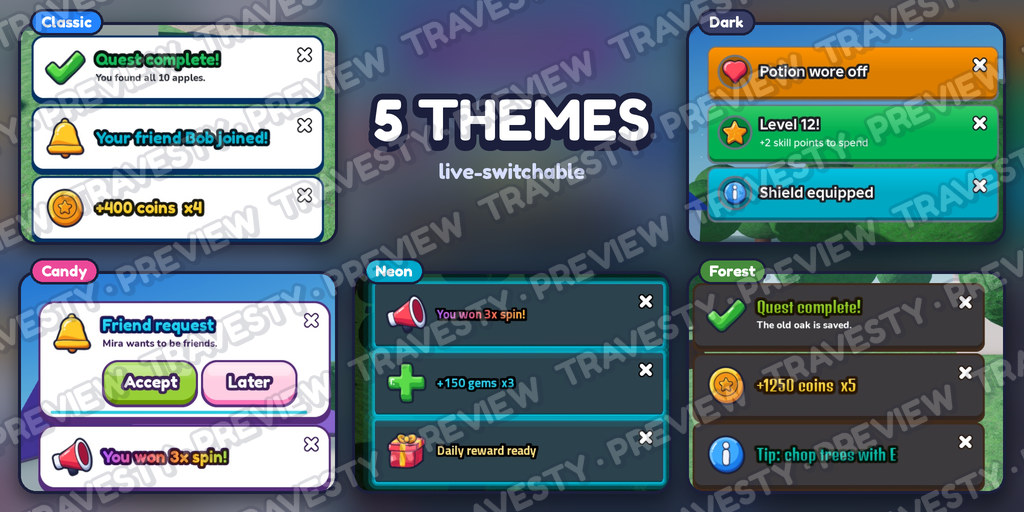
- Looks finished in your game, not pasted on. Five live-switchable themes (Classic, Dark, Candy, Neon, Forest), chunky cards with gradient titles, a big icon and a smooth slide in. Dark cards read over bright skies and snow; flip a setting for light ones.
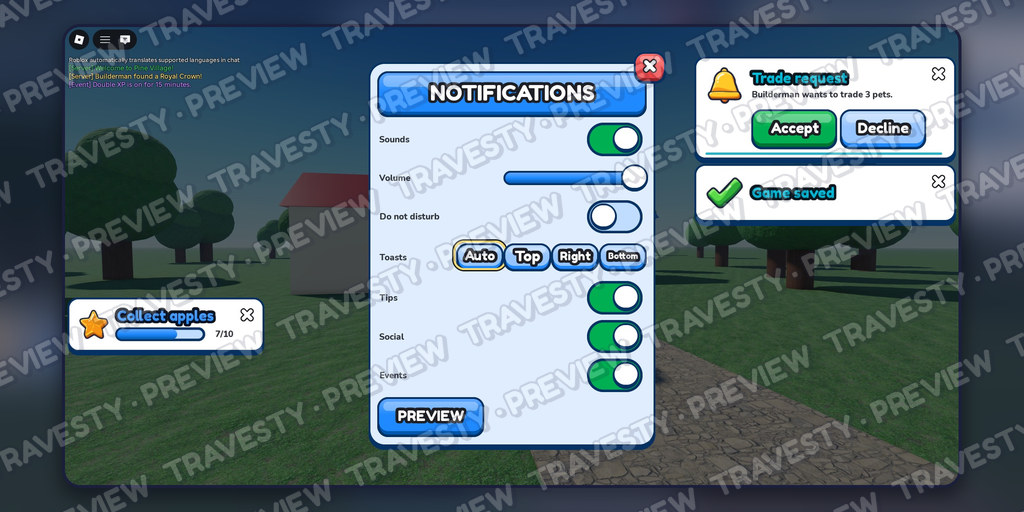
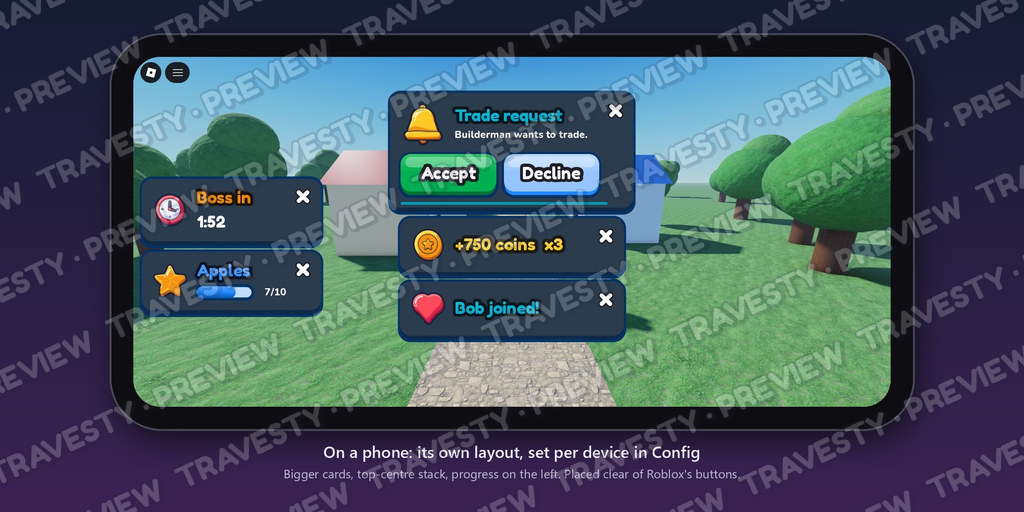
- Put them anywhere, with no code. Drag the Layout frames in Studio. Or set nine anchors per kind, per device, per call, or over your own UI frames (they follow the frame and survive respawns). Each kind has its own stack, so nothing collides. Players can move toasts themselves.
- Stays out of Roblox's way. Keeps clear of the player list, chat, the touch jump button and thumbstick, Roblox's own notifications, notches and the top bar, and re-places itself when they move.
- Safe server → client. Notify.to(player) works like the client API. Player replies are validated, rate-limited, one-shot and tied to the player they were sent to; an Accept/Decline timer is agreed between server and client, so a click the player sees succeed always counts. Every field of player-written text is filtered by Roblox's text filter (one call per message, not per player) and can't inject RichText. Server-only code never reaches clients.
- Built for every player. Follows Roblox's Reduced Motion (no slides, pops or shakes) and text-size settings; full gamepad support (hold Y to answer a prompt); haptics; touch swipe-to-dismiss; every line of built-in text in one table to translate.
- No code needed to start. Ready-made presets (CoinPickup, LevelUp, QuestComplete, FriendJoined, Checkpoint...) in one Config table: tag a part NotifyOnTouch with a Preset attribute and touching it shows that notification. In code it's one line: Notify.preset("CoinPickup", { amount = 50 })
- Autocomplete everywhere. Typed API: Studio suggests every function and option.
Everything included:
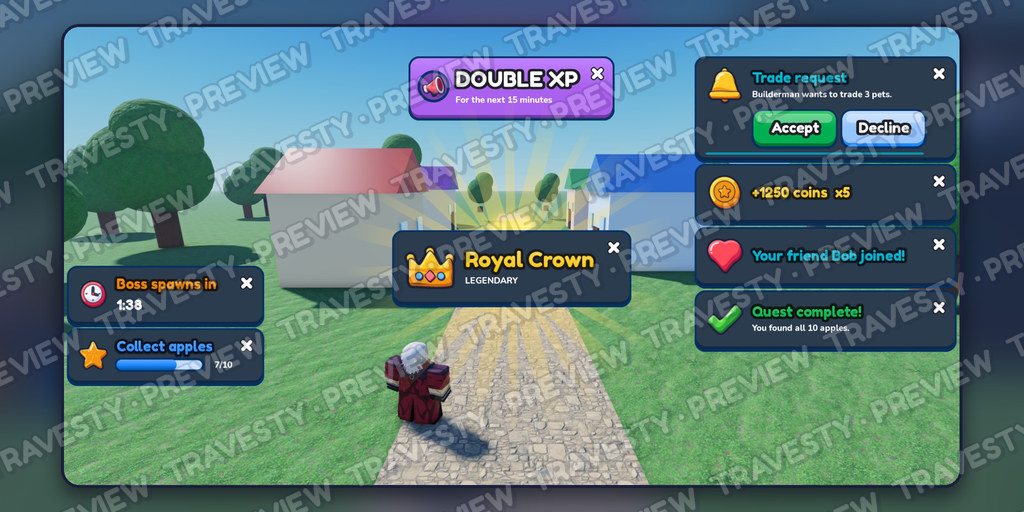
- Toast: stacking cards; types (success, error, reward, quest...), icons or avatars, click actions
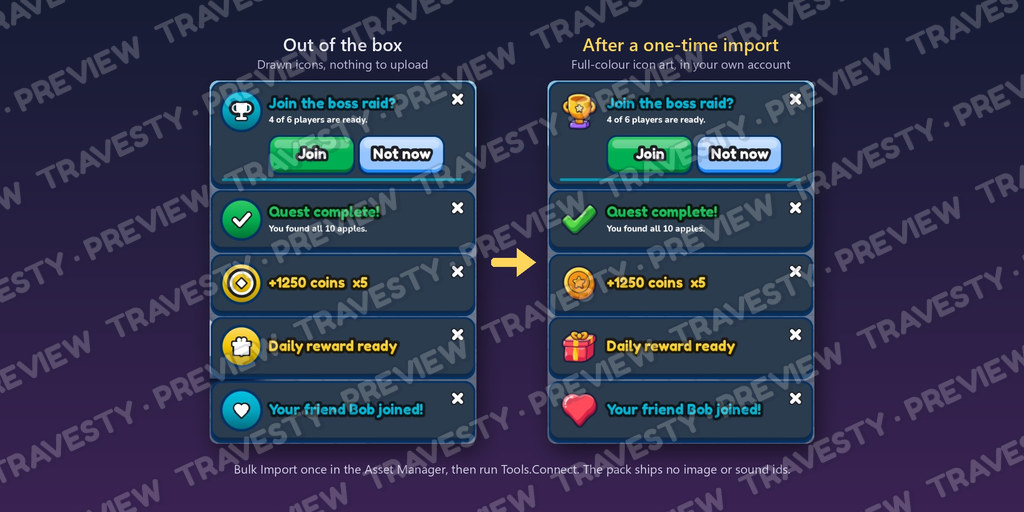
- Coalescing: "+250 coins" five times becomes one "+1250 coins x5" card
- Alert: compact warning that shakes once
- Banner: big announcement across the top
- Reward: centre popup with rarity rays and a count-up (common to mythic)
- Progress: live bar ("7/10") that updates in place
- Countdown: synced mm:ss timer ("Boss spawns in 2:33") with ticking at the end
- Action: Accept / Decline style choices with a timeout, answered on the client or server
- Chat: coloured system messages in Roblox chat
- Global: one call shows on every server (MessagingService)
- Admin commands: /announce , and /restart : a synced countdown on every server, plus a Restart event for your shutdown code
- Triggers: join/leave, friend joined, game pass bought, rotating tips, touch and prompt tags
- Player settings: mute, volume, do not disturb, position, categories: a ready window, saved for you
Optional: upgrade the art and sound
Everything works with nothing uploaded: placeholder drawn icons, and silent until you import sounds. The download also has the icons as full-colour art from our Icon Vector Pack (14 icons, plus big versions of the reward ones, in one image) and the sound files (30, plus each theme's own set). Bulk-import them in Studio's Asset Manager, insert them into the pack's Imported folder and run one command (Tools.Connect): every card gets the art and sound. They're your uploads in your own account; the pack ships no shared ids. Getting Started.pdf shows each click. Own the Icon Vector Pack? Any of its 250 icons works as a notification icon too. Each player gets their own notification volume.
A Getting Started guide with Studio screenshots comes in the download, and the README inside the pack lists every option. Works with the rest of the line. Every one of my packs and my upcoming ones in this line share one engine: they automatically use one consolidated configuration.
Details
- What's in the download (one zip): Getting Started.pdf and README.txt (the same steps), NotificationSystem.rbxm (one folder for ReplicatedStorage; no .rbxl, no loose scripts), LICENSE.txt, Icons/ (the icon art in one image, plus single PNGs) and Sounds/ (the .ogg files, with Sounds/Themes for each theme's own versions).
- Optional import: Asset Manager > Import, Insert into Imported, then Tools.Connect (or paste ids from Copy ID). Audio uploads count toward Roblox's monthly upload limit (30 files, or 60 with the theme sounds).
- Everything is in Config: looks, placement, presets, timing, sounds, admins, triggers, limits.
- Requires TextChatService (the default chat) for chat messages and admin commands.
- Global announcements need a published place (Roblox MessagingService), best effort, short text.
Purchase
In order to download this asset pack you must purchase it at or above the minimum price of $9.99 USD. You will get access to the following files:
Leave a comment
Log in with itch.io to leave a comment.